Minecraft tool
Java texture pack to Bedrock converter
This Java texture pack to Bedrock converter turns a Java resource pack zip into a Bedrock .mcpack. Textures only, and your file never leaves your browser. Unofficial fan tool. Checked
Convert Java resource pack to mcpack
Unofficial fan tool, not affiliated with Mojang or Microsoft. Do not convert packs you do not have the right to use.
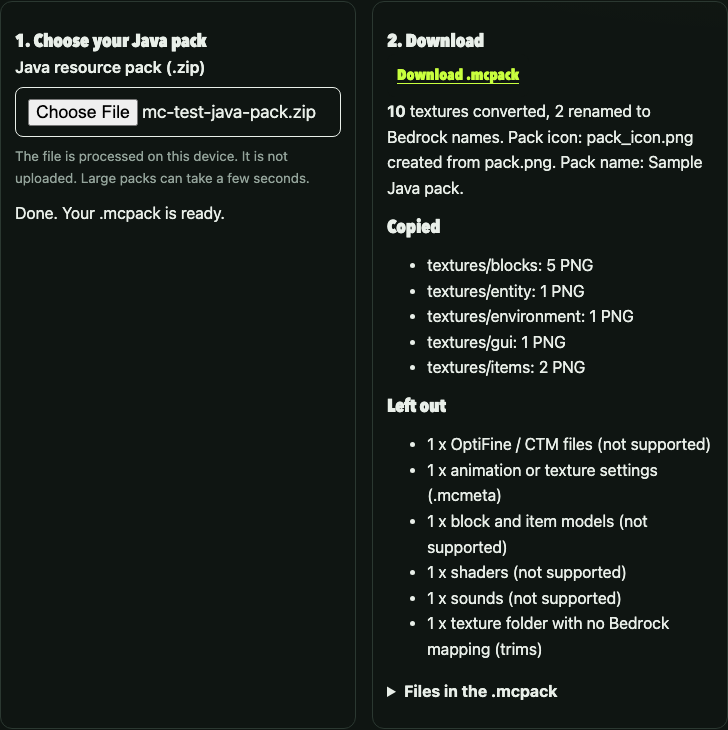
Convert Java resource pack to mcpack: what happens to your file
A Java resource pack and a Bedrock resource pack are both zip files full of pictures, but they are laid out differently. A Java pack keeps its pictures under assets/minecraft/textures and describes itself in pack.mcmeta. A Bedrock pack keeps pictures under textures, describes itself in manifest.json and shows a pack_icon.png in the menu. A .mcpack file is simply a zip with a different extension that Bedrock knows how to import.
The converter follows those differences step by step. First it opens your zip in memory using the JSZip library. It looks for pack.mcmeta to find the top of the pack, so a zip that wraps everything in one folder still works. It then walks every file, copies each supported PNG into the matching Bedrock folder, and ignores the rest. Finally it writes a manifest with a freshly generated identifier and packs the result for download.
The pack name in the manifest comes from the description in pack.mcmeta when it is plain text, otherwise from the name of your zip. The version is set to 1.0.0. Each conversion makes new identifiers, so installing a second conversion of the same pack on Bedrock is treated as a different pack, not an update.
The folder mapping
| Java folder | Bedrock folder |
|---|---|
| textures/block/ | textures/blocks/ |
| textures/item/ | textures/items/ |
| textures/entity/ | textures/entity/ |
| textures/environment/ | textures/environment/ |
| textures/gui/ | textures/gui/ |
| textures/painting/ | textures/painting/ |
| textures/particle/ | textures/particle/ |
| textures/colormap/ | textures/colormap/ |
| textures/misc/ | textures/misc/ |
Folders that are not in this table, such as armor trims, are listed in the report as left out. They are not silently dropped, so you can see what did not come across.
Names that differ between editions
For a short list of common blocks the file name itself is different. The tool renames these so the texture lines up with the Bedrock name:
| Java file | Bedrock file |
|---|---|
| block/oak_planks.png | blocks/planks_oak.png |
| block/spruce_planks.png | blocks/planks_spruce.png |
| block/birch_planks.png | blocks/planks_birch.png |
| block/jungle_planks.png | blocks/planks_jungle.png |
| block/acacia_planks.png | blocks/planks_acacia.png |
| block/dark_oak_planks.png | blocks/planks_big_oak.png |
| block/grass_block_top.png | blocks/grass_top.png |
| block/grass_block_side.png | blocks/grass_side.png |
The list is short on purpose. We only included names we could state with confidence, and we have not checked them on every Bedrock version. Most other block and item names are different too, so expect a partly converted result for packs that retexture many blocks. You can rename more files by hand inside the finished .mcpack, which is just a zip.
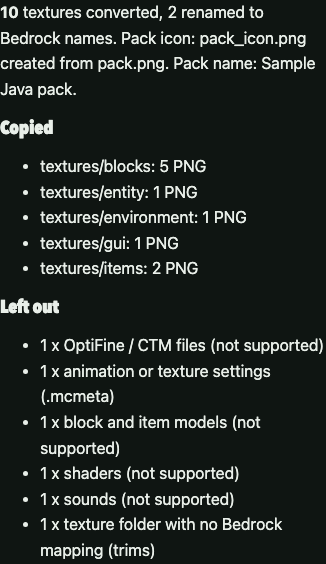
Java to Bedrock texture pack: install and check
After you download the .mcpack file, open it on the device where you play Bedrock. Open it with Minecraft from your file manager or share sheet so the game imports it. Then go to Settings, Global Resources, find the pack under My Packs and activate it. If you test on a world that already has a pack, put the converted pack above the others so its textures win.
To check the result, look at the textures you expect to see first: stone and dirt keep the same file names on both editions, and planks and the grass top are handled by the rename table, so these are the most likely to work. If they look right, the pack structure is sound and any missing textures are down to name differences, not a broken file. If nothing changes, make sure the pack is active and that your original pack has textures in assets/minecraft/textures/block, not in an older folder called blocks.
The .mcpack is made of the same PNG files as your source, copied byte for byte. We do not resize, recolor or compress the pictures, so the quality is the same as the original. The zip itself is compressed with the standard deflate method.
For a different kind of random pick, see the D&D 5e spell scroll random generator or the Hunt: Showdown loadout randomizer.
What this converter does not do
This is a basic texture mover, not a full porting tool. The following are not supported, and the report shows how many of each your pack contained:
- Block and item models. Java uses JSON models to shape blocks and items. Bedrock handles shapes differently, so custom model packs need a dedicated tool or manual work.
- Animation. The .mcmeta files that animate water, lava or custom textures are skipped. Bedrock uses a separate flipbook file that this tool does not write.
- Connected textures and OptiFine features. Files under optifine or mcpatcher are skipped.
- Shaders, sounds, languages and fonts. These are different systems on the two editions and are left out.
- Most file renames. Only the short list above is renamed. Everything else keeps its Java name.
The pack is also limited to 20,000 files and 400 MB of unpacked textures, to keep your browser responsive. A pack that large is rare. If your pack is bigger, remove the parts you do not need before converting.
Licensing deserves a note. The converter library, JSZip version 3.10.1, is used here under its MIT licence; a copy of the licence is served at /assets/vendor/JSZIP-LICENSE.txt. We did not copy code from any other converter. The folder mapping is written from the public layout of both pack formats. Only convert packs you made or have permission to modify, and respect the licence of any pack you did not make.
We have tested the converter with a small pack we built ourselves and with the file listing shown in the report. We have not tested the output in the Bedrock app on every platform. Treat the first conversion of a new pack as a draft and check it in game.
Quick answers
Does my resource pack get uploaded to a server?
No. The zip is read and rewritten by JavaScript running in your browser tab, and the finished .mcpack is created in memory and offered as a download. Nothing is sent to us or anyone else. You can switch off your network after the page has loaded and the converter still works.
Which Java versions does it read?
It reads any Java resource pack zip that keeps its pictures under assets/minecraft/textures with the modern folder names block and item. Very old packs that use blocks and items folders are not remapped and will show up as unmapped folders in the report.
Why do some textures show as the default ones in Bedrock?
Bedrock looks textures up by its own names and, for many blocks and items, those names differ from Java. This tool renames only a short list. Any other texture keeps its Java file name and Bedrock ignores it if the name is not one it uses.
What is left out?
Block and item models, animations (.mcmeta), connected textures, OptiFine files, shaders, sounds, languages and fonts are not converted. The report lists what was left out for your pack.
Will the .mcpack work on Bedrock Edition?
The pack has a valid manifest with a new identifier, so Bedrock can import it. We have not tested the output on every Bedrock device, so open it once on your device and check the textures you care about.
Is this tool official or affiliated with Minecraft?
No. It is an unofficial fan tool, not affiliated with Mojang or Microsoft, and it does not include any Minecraft files.
Where this comes from
The converter and its folder mapping were written for this site from our own knowledge of the two pack layouts and tested with a pack we made; we did not check the mapping against an official page. This page is an unofficial fan tool and is not affiliated with Mojang or Microsoft.
- JSZip 3.10.1 (MIT) read Nov 2, 2026 zip reading and writing in the browser